You print 500 flyers, walk them on a Saturday and wait for the phone. It rings twice, and you judge the whole drop on those two calls.
Plenty of other people read the flyer and wondered what their place is worth. They didn't ring because they weren't ready to talk to an agent. They were ready to look at a number. A normal flyer gives them nowhere to do that, so you never hear about them.
There are sellers in every drop
In a typical suburb about 2% of homes sell in any 12-month period. Drop 500 flyers and roughly 10 of those households will sell within the year. With a standard flyer, you have no idea which 10.
Homes selling in 12 months
10
Ones a normal flyer shows you
0
Assumes 2% of homes sell each year. Your suburb may be higher or lower.
The idea: one QR code per house
A QR code is just a web link in a format a phone camera can read. Most flyers use one code for the whole drop, so every scan lands on the same page and you can't tell them apart.
Change one thing: give every house its own link. 14 Banksia Ave gets one code, 16 Banksia Ave gets another. When a code is scanned, the link itself tells you which flyer it came from, and therefore which address.
What a scan tells you, and what it doesn't
What you learn: the address the flyer went to, when it was scanned, and whether it was opened on a phone or a computer. If your page saves a cookie on that first visit, you can also tell when the same device comes back later.
What you don't learn: who scanned it. It could be the owner, their partner, a tenant, or a neighbour who got the wrong mail. You know the house, not the person. Cookies are also limited to one device, and Safari deletes cookies created by page scripts after seven days, so tracking return visits properly needs the cookie to be set by your server.
That's still plenty to act on. A home that scans your flyer and comes back twice the following week is a better call than anyone else on the street.
Give them a reason to scan
Tracking only works if people scan. "Visit our website" gets very few. "See what 14 Banksia Ave is worth" gets many more, because it's about their home. The page they land on then has to deliver: a value estimate, recent sales nearby, something a generic flyer can't give them.
Avoid sending scans to a property portal. You'd record the visit, but you'd also hand the homeowner a page full of other agents' listings and ads.
Building it yourself with ChatGPT or Claude
You don't need a developer for a basic version. An AI assistant like ChatGPT or Claude can walk you through each step and write any code for you.
1. Address list. Export the street from your CRM into a spreadsheet, one row per house.
2. Unique links. Have the AI add a random code to each row and build a link like yoursite.com.au/v/k7x2p9. Use random codes rather than addresses in the link, so nobody can edit it to look up their neighbour's home.
3. QR images. Ask for a short script that turns each link into a QR code image.
4. The flyers. Use mail merge in Word, or bulk create in Canva, to produce one page per row with that address and its QR code.
5. Landing page and scan log. This is the hard part. You need a page that reads the code, looks up the address, records the scan and shows the homeowner something worth seeing. The AI can build a simple version that logs scans to a Google Sheet.
Prompt to start with: "I'm a real estate agent with a spreadsheet of 200 addresses. Help me give each one a unique random code, generate a QR code image for each, and set up a simple web page that logs every scan to a Google Sheet with the address it came from."
Add a line to the flyer explaining that the code is unique to the home, and check your privacy policy covers what you're recording.
Where the DIY version falls short
The flyers are the easy part. The work is in everything after the scan.
Valuations. Showing each home a believable value needs property data and recent sales. Without it, the landing page has nothing worth scanning for.
Alerts. A spreadsheet log only helps if you remember to check it. Getting notified needs to be built separately.
Your CRM. Scans sit in their own spreadsheet, apart from your contact records and the rest of your follow-up.
Repeat drops. Every new street means running the whole process again.
None of it is out of reach. It's just a lot of moving parts for something you want to run every month.
How Vendorleads handles it
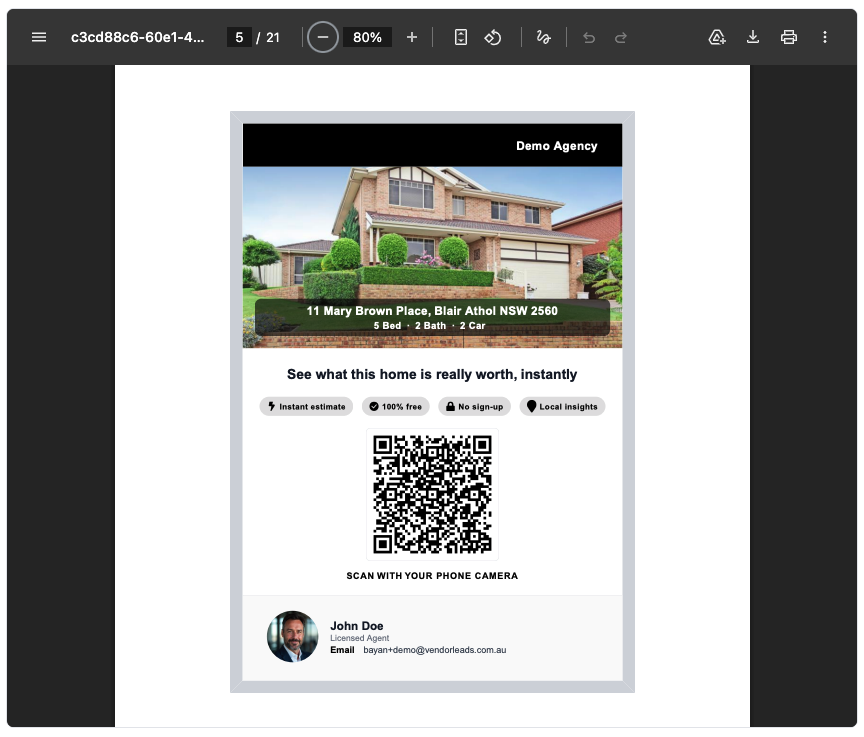
We've built all of this into Vendorleads, so the setup is already done. Pick a street, tick the homes you want (filter to owner-occupied to skip rentals) and download one PDF with a page per house. Each page shows the home's photo, its bed, bath and car count, and a QR code that opens a branded valuation of that exact address.
It also fixes the biggest limit of the DIY version. Before the valuation opens, the homeowner enters their mobile number and we text them a personal link to it. You know who scanned, not only which house.
Same result, different amount of work
Export addresses to a spreadsheet
Generate codes, links and QR images
Mail merge one page per house
Build and host a landing page
Find valuation data to show
Check the scan log by hand
Pick a street and tick the homes
Download the PDF
One personalised page per property, with your branding and copy.
Get notified when a home scans
The homeowner enters their mobile to open the valuation. Every visit after that is tracked and feeds into your contact scores.
Make your next letterbox drop trackable